Championship Setup
Create Championship
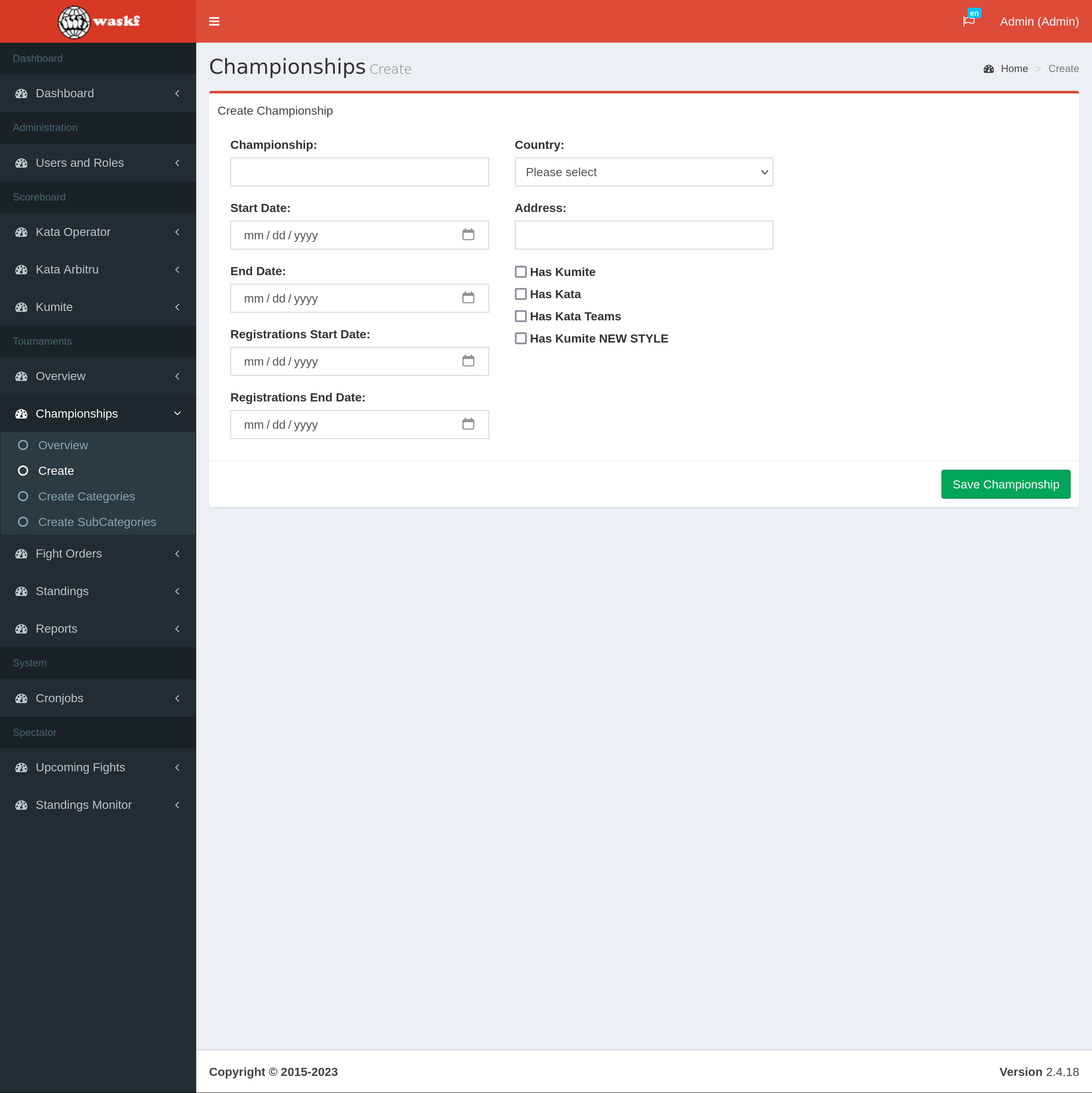
To create a Championship in a professional and systematic manner, follow these steps. By following these steps, you can ensure that all necessary information is provided, tournament types are selected appropriately, and the Championship is saved accurately.
- Log in to your account as the administrator.
- Navigate to the Scoreboard section in the application.
- Once the Scoreboard is loaded, access the Championship menu and select the "Create" submenu.
- Complete all the required fields for the Championship, providing accurate information.
- Choose the tournament types that should be generated for the Championship, considering the specific requirements and rules.
- Save the Championship, ensuring that all the provided details are accurate and complete.
After saving the Championship, in addition to the selected tournaments, two additional Demo tournaments will be automatically created. These Demo tournaments serve the purpose of simulating the scoreboard if needed, allowing organizers to test and familiarize themselves with the scoreboard functionality. This feature provides a valuable tool for ensuring a seamless and efficient tournament experience.